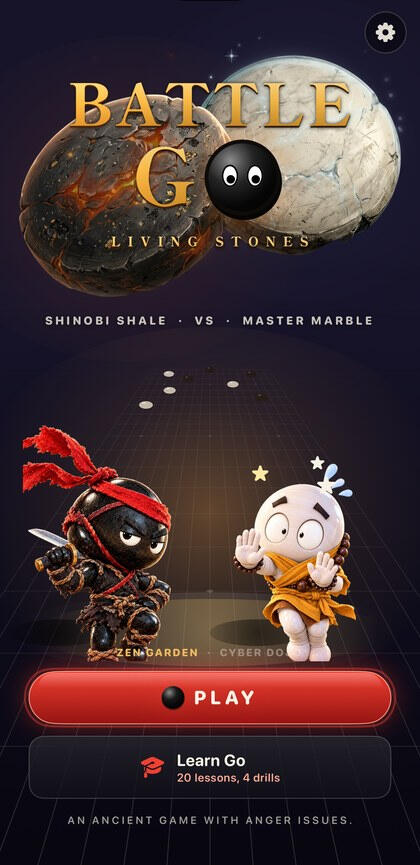
An ancient game with anger issues.
Not out yet · testers first · iPhone
Real Go. Until somebody gets captured.
Battle Go: Living Stones is the ancient board game, played by its real rules, with stones that have feelings. They sweat when they're nearly surrounded, and when you capture some, they stand up on the board and fight about it: a few seconds of cartoon slapstick, then everyone sinks back into their stones and the game goes on.
Whoever picks it up.
Go has been played in East Asia for thousands of years, and for decades it was the game computers couldn't win. When one finally beat one of the world's best players, it was news everywhere. If you've always been curious but it looked a little quiet, this is the loud version: real Go with a show on top, and it works whether you have never played or play every week.
- 🔰Never played GoTwenty short lessons and four drills on a real board, whenever you want them.
- ⚫Already playReal rules on 9×9, 13×13 or 19×19, against four levels of computer.
- 🤝Two at one phonePass and play with a friend, each of you one of the world's two fighters.
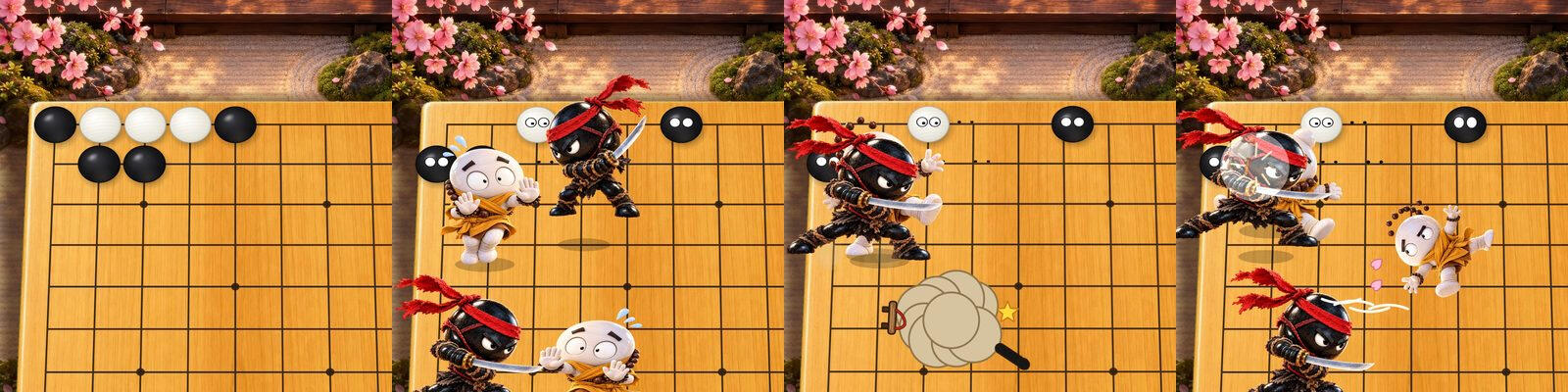
- 🥊Here for the fightsIn Full show, the default, every capture of three or more stones turns into a cartoon brawl.
A capture, in four frames.
- One breath left.Three white stones, hemmed in.
- They stand up.The move that takes them starts a brawl.
- The rumble.Several little fights at once.
- The knockout.Then back into the stones.
In Full show, every capture of three or more stones becomes a brawl on the board. Smaller captures get a quick gag instead, and so does a big one in Quick show or with Reduce Motion on. Nobody is ever hurt in a way that stops being cartoon, and the board always ends exactly where the move left it. Tap the board during any animation to skip it.
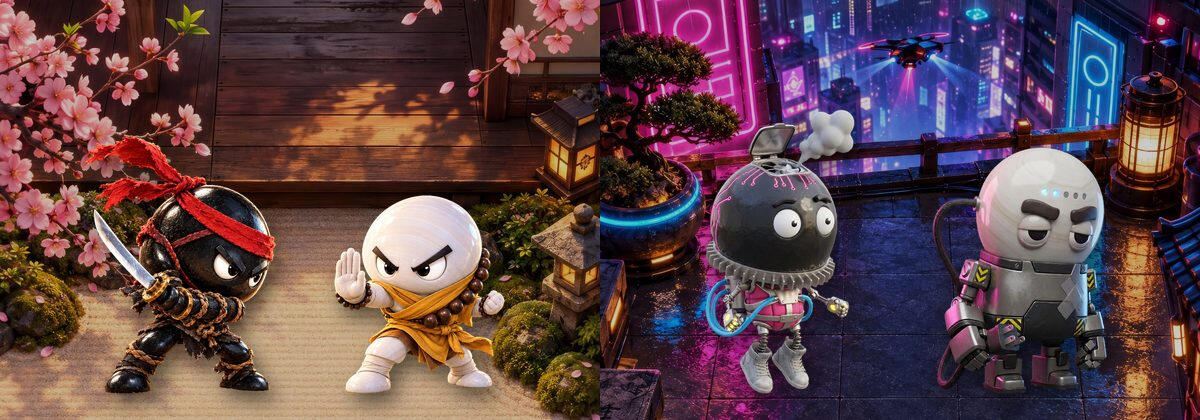
Two worlds, two very different fights.
Each world has its own board, its own pair of fighters, its own jokes and its own music. The heads are always Go stones, black and white, so you always know whose side is whose.
- VSZen GardenFind your balance.Shinobi Shale and Master MarbleA garden at golden hour, calm until it isn't: a koi slap, a gong to the head, a rake stepped on, an anvil from nowhere, and a very rare koi. The music is rain on the garden, and when the game heats up, the weather does too.
- VSCyber DojoHigh tech. Higher stakes.Hot Rock and Cool QuartzA rooftop dojo over a neon city at night. Hot Rock runs so hot his stone has to be air-cooled; Cool Quartz is stuck in power-save and grumpy about it. The music is a neon hum over the city, turning to synthwave as the game heats up.
Two more worlds show in the app, locked: they aren't released yet.
Learn Go, if you want it.
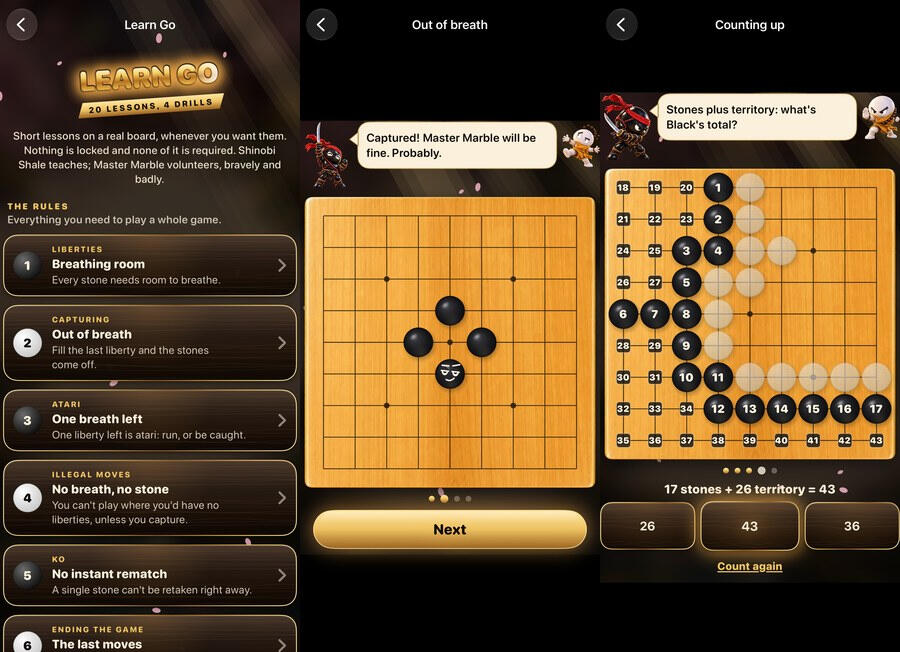
Never played? Twenty short lessons and four drills, on a real board, from the first liberty to counting a finished game. Each world's own two fighters teach them, and the white one volunteers for every demonstration.
- Twenty lessons, four drills.Five chapters, with drills at the end.
- Taught on the board.The teacher talks; the stones react.
- Counting, taught.Count with me numbers every stone and point.
Short lessons on a real board, whenever you want them. Nothing is locked and none of it is required.Learn Go's own first line. A game is always one tap away.
Play it your way.
- 🤖Against the computerFour levels, and it plays on your phone. Battle Go's own engine plays to start; a KataGo neural-network opponent, still in beta, is a choice in Settings.
- Beginner
- Casual
- Club
- Strong
- 🤝A friend on this phonePass and play: each of you is one of the world's fighters, black moves first, and you hand the phone over after each move. The winning fighter gets the victory pose and the headline.
Hand the phone over
- ⚪9×9, 13×13 or 19×19A quick tap places a stone on any board. If you'd rather aim first on the big boards, Confirm moves on big boards is in Settings. The size button on the game screen starts the same match again on another size.
Placing stones
- 🎬As much show as you likeFull show, every capture a fight. Quick show: the same personality, cut short. Quiet board: a traditional board, stones come and go quietly. With Reduce Motion on, nothing flies or shakes.
Show
Restart and Resign sit right on the game screen. In the first ten moves Restart starts over at once, and after that it asks; Resign always asks. Undo, Hint, Pass and Menu are underneath, and Explain moves names atari, ladders and ko as they happen.
What you pay.
- Nothing you have paid for ever moves behind a new price.
What stays on your iPhone.
What the game keeps is kept on your iPhone: your settings, the game you're in the middle of, and which lessons you've finished. The computer opponent, the music and the art all run on the phone, and in this version the game has no internet connection and no link to other phones. There's no account, no server of ours, no analytics and no advertising. The details are in the privacy policy below.
Battle Go is still being made. It runs on its maker's phone today, it's coming to testers soon, and it isn't on the App Store yet. It's made for iPhone, held upright: there is no iPad or Mac version. Not in this version: playing against a friend's phone nearby, and the two locked worlds.
Battle Go: Living Stones — Support
Real Go, with stones that fight back.
Most of Battle Go explains itself once the first stone goes down, and Learn Go on the title screen teaches the whole game on a real board, for anyone who wants it. Settings is the gear in the corner of the title screen, or Menu ▸ Settings during a game. This page answers what people ask. Anything else, write to us using the form below.
Or just write to us.
There is one person behind this shop, and he reads everything that comes through this form. Three kinds of message are all welcome, and they all arrive in the same place:
- Something is wrong with the game. Say which world, which board size, what you tapped, and what you expected instead.
- A rule looks wrong. Go is old and exact. If a capture, a ko or a count doesn't match the rules as you know them, describe the position.
- You want software built. Not only iPhone apps. If the thing you use every day at work is worse than it should be, describe it and you will get a real answer about whether it is worth building. Quotes are free and the first reply is a person.
Your name, your email address and your message are emailed to the shop. They are used to answer you and nothing else. The full account is in the privacy policy below.
Common questions
- I've never played Go. Where do I start?
- Tap Learn Go on the title screen: twenty short lessons and four drills, from liberties and capturing to counting a finished game. Nothing is locked and none of it is required, so you can stop at any point and play. Explain moves (Settings ▸ Help, on to start) names atari, ladders, ko and more as they happen in a real game.
- How do I place a stone?
- Tap the point. A quick tap places on every board, and press, aim and lift always places. If you'd rather aim first on the bigger boards, switch on Confirm moves on big boards in Settings ▸ Placing stones: on 13×13 and 19×19 the first tap aims and the second places. Settings ▸ Board can also show the board Flat, looking straight down, from your next game.
- The fights take too long.
- Tap the board during any animation to skip it. Or choose how much show you want in Settings ▸ Show: Full show, Quick show (the same personality, cut short), or Quiet board (a traditional board; stones come and go quietly).
- How do I start over, or resign?
- Restart and Resign are on the game screen, above Undo, Hint, Pass and Menu. In the first ten moves Restart starts the same game over at once; after that it asks first. Resign always asks. Keep playing takes you back. For a different match, use Menu ▸ New game…
- How do I change the world, or the board size?
- Before a game, tap Play on the title screen, set the board and opponent under the worlds, then tap a world's card: the game starts there. In a game, Menu ▸ Switch world… starts a new game in another world, and the size button on the game screen (or Menu ▸ Board size…) starts the same match again on another size. Both ask first if there are moves on the board, because that game ends.
- Why are two worlds locked?
- They aren't released yet. Their cards show among the worlds, marked Coming soon, and can't be played in this version.
- How is the game scored?
- By area: each side's stones on the board plus the empty points only that side surrounds, with 7.5 points of komi added to white. Ko and superko are enforced, and handicap games aren't offered. Learn Go's Counting up lesson counts a whole board with you.
- The computer is too strong, or too weak.
- Pick its level in New Game: Beginner ("Just learning. It plays loosely and leaves you room."), Casual, Club or Strong. Strong may resign when its game is lost. Settings ▸ Computer offers a second opponent, KataGo (beta), a neural network that's much stronger from Casual up. It applies from your next game.
- Can I play a friend?
- Yes, on the same phone: tap Play, choose Opponent ▸ A friend, on this phone, then tap a world's card. Each of you is one of that world's fighters. Black moves first, then you hand the phone over after each move, and Undo takes back the last move, whoever played it. Playing against a friend's own phone is not in this version.
- Where did my game go?
- A game in progress is kept on your phone. Tap Continue on the title screen to pick it up; it shows the game's world, board and move. There is one saved game, and it stays until you play a move in a new one. A finished game clears it.
- No sound?
- Music and sounds follow the ringer switch, so with the ringer off they're quiet. Music, sounds and haptics each have their own switch in Settings ▸ Sound. The title screen's own music and every button's tap and haptic follow the same three switches.
- Can I play with VoiceOver?
- Yes. The board is one control: swipe up or down to move across the points, double-tap to play, and each move is read out.
- Does it work on iPad or Mac?
- There is no iPad or Mac version. It's made for iPhone, held upright, on iOS 26 or later, and it's in English only.
- Does the app track me or show ads?
- No analytics, no advertising, no tracking and no account. What it keeps, and where, is in the privacy policy.
Battle Go: Living Stones — Privacy Policy
Last updated September 25, 2026
Battle Go: Living Stones is a game of Go you play on your own iPhone, against the computer or a friend sitting next to you. It has no account and no server of ours, and nothing about you is sold. What the app keeps, it keeps on your iPhone.
What the app stores, and where
- Your settings: how much show you want, music, sounds, haptics, move explanations, the board's view, whether big boards confirm a move, and the last game's level, board size, color, opponent, engine and world. Also a count of how many times the tap-again tip has shown, so it stops after three.
- Which Learn Go lessons you have finished, so the list can tick them.
- The game in progress, so Continue can pick it up: the moves, the world, who is playing which color, whether it is against the computer or a friend, the level, the engine and when it was saved. A finished game clears it.
- All of this is kept in the app's own storage on your iPhone. Like any app's data, it is included in your iPhone's own backups, to iCloud or to a computer, if you make them.
- When the neural-network opponent loads, a note of how long it took can go to the iPhone's own system log, and so can a description of any problem with the sound, the haptics or that opponent. The app does not send any of it anywhere.
- Deleting the app removes everything it kept on the device.
Permissions the app may ask for
- None in this version. The app never asks for the camera, photos, microphone, contacts, location, calendar, notifications, Bluetooth or permission to track you. It carries the words for a Local Network request, which playing against a friend's phone would need; that is not in this version, so it never asks.
Everything that leaves your device
In this version, the app itself sends nothing. The computer opponent (Battle Go's own engine, or KataGo's neural network if you choose it) thinks on your iPhone, and the music is composed on it as you play. The game has no connection to the internet and no link to other phones, and there is no server for anything to go to. The app has no analytics, no advertising, no advertising identifier and no crash reporting of its own.
Settings ▸ Acknowledgments names the KataGo project's pages on GitHub, as text. The app does not open or fetch them.
If you test it through TestFlight, or have turned on Share With App Developers in your iPhone's settings, Apple passes crash reports on to the developer, as it does for every app.
What is never done
Nothing about you is sold, rented, or handed to a data broker: not aggregated, not anonymized, not “with a trusted partner”. No profile of you is built anywhere.
How future decisions get made
Everything above describes the app as it is today, and every line of it can be checked.
If this app ever needs a third-party service, or a kind of data it does not take today, that choice gets made for the person using it rather than for the revenue, it will be described here before it ships, and it will be switchable off wherever it can be.
Purchases
This version has nothing to buy inside it and asks nobody for payment. Battle Go is not for sale yet. When it is, Apple handles any payment, and the developer never sees your payment details.
Children
Battle Go asks nobody for an account, an email address, a name or an age, and the app itself sends the developer nothing.
Changes
If this policy ever changes, the updated version will be posted at this address with a new date at the top.
Writing in
Contact is a form on this page rather than an email address. What you type into it (your name, your email address and your message) is emailed to The Butcher Shop LLC by the service that hosts this website, and that service's own privacy policy covers the delivery. The message is used to answer you, and the reply comes from the person who made the app. The app itself has no part in this: it sends nothing when you write in, and nothing you say in the form is joined to anything in the app.
Contact
Questions about privacy in Battle Go: Living Stones: Send us a message.